

GUIDE: Is your home vulnerable to earthquakes and other hazards? Here's how to check
Being prepared for natural calamities, including earthquakes and typhoons, could help minimize their impact not only on your property but also your life.
Did you know that there's a way to check if your location is vulnerable to hazards? HazardHunterPH, which was put together by the Department of Science and Technology - Philippine Institute of Volcanology and Seismology, is an online tool that assesses the likelihood that earthquakes, typhoons, volcanic eruptions, and other natural calamities will impact any point within the Philippines.
You can just pinpoint a specific location, and the interactive tool will then generate a report containing assessments of seismic (earthquakes), volcanic, and hydro-meteorological (extreme weather events) hazards. It will also show the nearest critical facilities in the area. You can even have the option to download a PDF file containing a comprehensive report with recommendations.
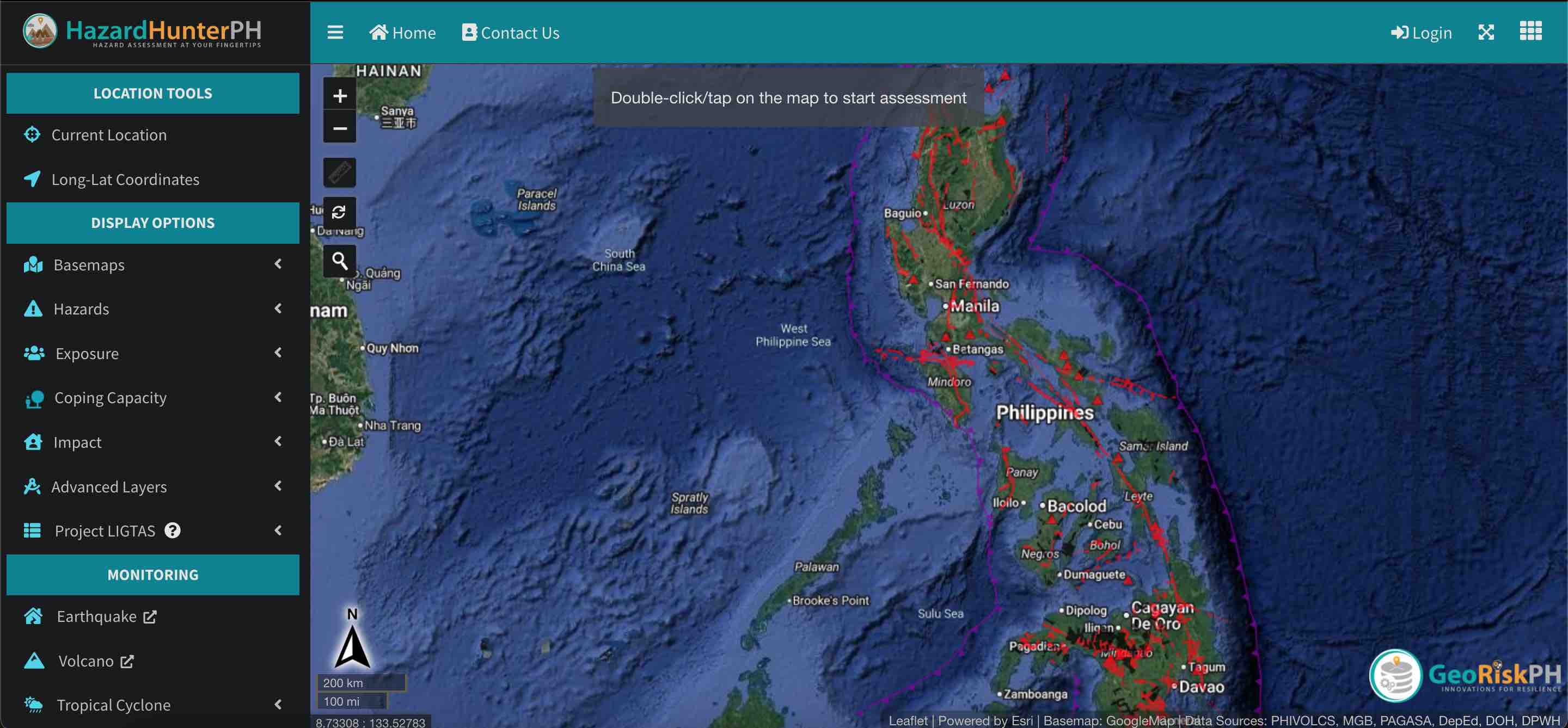
Here's a step-by-step guide on how to navigate HazardHunterPH:
- Go to https://hazardhunter.georisk.gov.ph/ on your computer or mobile device.
- To start a hazard assessment, you have three options. The first one would be to type a location—for example, Quezon City. A drop-down menu will appear where you can pick a more specific area. If what you are looking for does not appear in the menu, simply click on the search button. Alternatively, you can input coordinates, or just go straight to the "map view."
- On the left panel of the screen (or in a drop-down menu on a mobile device), the tool will give the option to view the map using satellite imagery or a street POV. You may also choose which calamities you want the tool to base the assessment on. (For example, HazardHunterPH can generate a report solely on the active faults and active volcanoes near your specified area.)
- The tool will then present a map of the Philippines, with fault lines highlighted in red. Zoom in to find a specific location. Once you find it, double-click on the location to begin the assessment.
- Assessment results appear within minutes. If you would like a more comprehensive report, scroll to the bottom of the report and tap "View report with recommendations." A separate window will open with a PDF file containing an official report by DOST-PHIVOLCS. In it, you will find explanations of the assessment, as well as recommended actions.
Aside from helping homeowners become prepared for natural disasters, these reports are also useful for potential property buyers, land developers, and planners.
If your organization would like an Official Hazard Assessment Report, you can send a request to DOST-PHIVOLCS, DOST-PAGASA, or DENR-MGB. However, an official report may require payments to cover reproduction costs.
HazardHunterPH is a multi-agency effort produced by GeoRisk Philippines, led by DOST-PHIVOLCS, and participated by DOST-PAGASA, DOST-ASTI, DENR-MGB, DENR-NAMRIA, DND-OCD, and DepEd. Contributing to the success of the tool are the Geological Survey of Japan and students from UP Diliman's DRMAPS class of 2019.
All the information used to calculate the results are based on the latest data from government agencies within the GeoRiskPH Integrated System.