

Instagram is letting you tweak your Reels algorithm. Here's how
Have you been seeing Instagram stories from your friends posting about their algorithm? Turns out, you can now tweak what you see on your Reels feed in the Meta app.
Instagram head Adam Mosseri shared about this new feature on Threads on Oct. 31.
"We're starting to test a way for you to tune your algorithm on Instagram by adding and removing topics based on your interests," he wrote. "We're launching this feature on Reels first, with plans to expand to Explore soon."
Mosseri added that the platform is exploring implementing a similar feature on Threads.
"We want people to have more control over their Instagram experience, and hope this will be a meaningful new way to shape what you see."
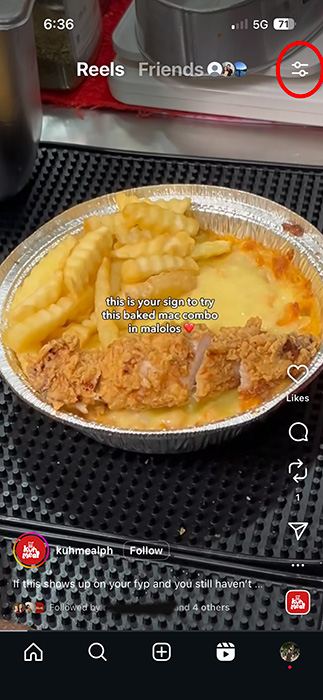
To tune your algorithm, first make sure you're on the latest version of the Instagram app. Then, go to the Reels tab and click on the Settings icon in the top right corner.
You'll then be shown a quick description of your algorithm. You can share this to your Instagram stories by tapping on the airplane icon in the top-right corner.
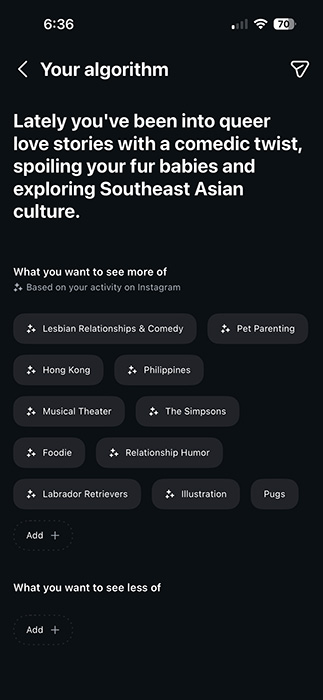
Under the description, you'll see topics for "What you want to see more of" based on your activity on Instagram. This can look like "Hong Kong," "Pet parenting," "Relationship humor," and more.
You can tap on Add at the bottom to input more topics you want to see in your Reels feed, like workouts, for example.
At the bottom, you also have the option to list topics that you want to see less of.
This feature may only be available for select users, but you can also access it when you tap on a friend's Instagram story about their algorithm.